Documentation Index Fetch the complete documentation index at: https://docs-staging-quickstart-revamp.mintlify.app/llms.txt
Use this file to discover all available pages before exploring further.
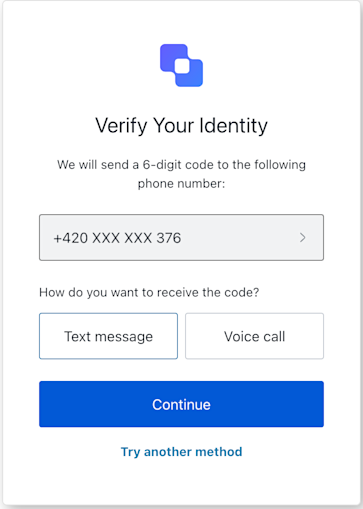
MFA Phone Challenge screen class The MFA
Import and instantiate the MFA Phone Challenge screen class:
import MfaPhoneChallenge from '@auth0/auth0-acul-js/mfa-phone-challenge' ; const mfaPhoneChallenge = new MfaPhoneChallenge (); // You can access screen data like the phone number const phoneNumber = mfaPhoneChallenge . screen . data ?. phoneNumber ; console . log ( 'Phone number for challenge:' , phoneNumber ); // Access transaction details like errors const errors = mfaPhoneChallenge . transaction . errors ; if ( errors ) { console . error ( 'Transaction errors:' , errors ); }
Properties The MFA Phone Challenge screen class properties are:
branding
client
organization
prompt
screen
tenant
transaction
untrustedData
interface branding { settings : null | BrandingSettings ; themes : null | BrandingThemes ; } interface BrandingSettings { colors ?: { pageBackground ?: string | { angleDeg : number ; end : string ; start : string ; type : string ; }; primary ?: string ; }; faviconUrl ?: string ; font ?: { url : string ;}; logoUrl ?: string ; } interface BrandingThemes { default : { borders : Record < string , string | number | boolean >; colors : Record < string , string >; displayName : string ; fonts : Record < string , string | boolean | object >; pageBackground : Record < string , string >; widget : Record < string , string | number >; }; }
interface client { description : null | string ; id : string ; logoUrl : null | string ; name : string ; metadata : null | {[ key : string ] : string ;}; }
interface organization { branding : null | { colors ?: { pageBackground ?: string ; primary ?: string ; }; logoUrl ?: string ; }; displayName : null | string ; id : null | string ; metadata : null | {[ key : string ] : string ;}; name : null | string ; usage : null | string ; }
interface prompt { name : string ; }
interface screen { captcha : null | CaptchaContext ; captchaImage : null | string ; captchaProvider : null | string ; captchaSiteKey : null | string ; data : null | { phoneNumber : string ;}; isCaptchaAvailable : boolean ; links : null | Record < string , string >; name : string ; texts : null | Record < string , string >; } interface CaptchaContext { image ?: string ; provider : string ; siteKey ?: string ; }
interface tenant { enabledFactors : null | string []; enabledLocales : null | string []; friendlyName : null | string ; name : null | string ; }
interface transaction { alternateConnections : null | ( Connection | EnterpriseConnection )[]; connectionStrategy : null | string ; countryCode : null | string ; countryPrefix : null | string ; currentConnection : null | Connection ; errors : null | Error []; hasErrors : boolean ; locale : string ; state : string ; } interface Connection { metadata ?: Record < string , string >; name : string ; strategy : string ; } interface EnterpriseConnection { metadata ?: Record < string , string >; name : string ; options : { displayName ?: string ; iconUrl ?: string ; showAsButton : boolean ; }; strategy : string ; }
interface untrustedData { authorizationParams : null | { login_hint ?: string ; screen_hint ?: string ; ui_locales ?: string ; [ key : `ext- ${ string } ` ] : string ; }; submittedFormData : null | { [ key : string ] : | string | number | boolean | undefined ; }; }
Methods The MFA Phone Challenge screen class methods are:
continue( options ?) This method submits the user’s choice of receiving the MFA code via SMS or voice call. It uses the phone number from the class screen property.
const mfaPhoneChallenge = new MfaPhoneChallenge (); // Request code via SMS await mfaPhoneChallenge . continue ({ type: 'sms' }); // Request code via Voice Call await mfaPhoneChallenge . continue ({ type: 'voice' });
Parameter Type Required Description typesms | voice Yes define the method to receive the verification code.
pickPhone( options ?) This method redirects the user to a phone selection screen.
const mfaPhoneChallenge = new MfaPhoneChallenge (); await mfaPhoneChallenge . pickPhone ();
tryAnotherMethod( options ?) This method redirects the user to the authenticator selection screen.
const mfaPhoneChallenge = new MfaPhoneChallenge (); await mfaPhoneChallenge . tryAnotherMethod ();
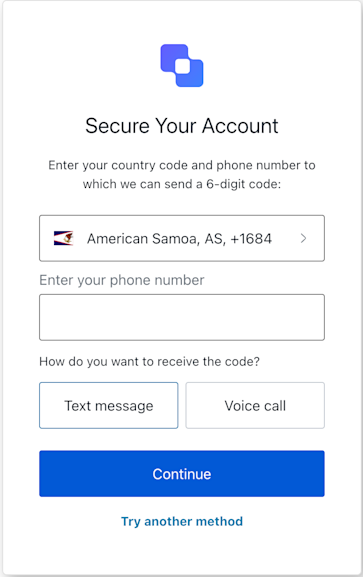
MFA Phone Enrollment screen class The Device Code Confirmation screen class provides methods associated with the mfa-phone-enrollment screen. This screen is displayed when a user needs to confirm the device code.
Import and instantiate the MFA Phone Enrollment screen class:
import MfaPhoneEnrollment from '@auth0/auth0-acul-js/mfa-phone-enrollment' ; const mfaPhoneEnrollment = new MfaPhoneEnrollment (); // Call the continueEnrollment method with a phone number and type mfaPhoneEnrollment . continueEnrollment ({ phone: "1234567890" , type: "sms" // or "voice" });
Properties The MFA Phone Enrollment screen class properties are:
branding
client
organization
prompt
screen
tenant
transaction
untrustedData
user
interface branding { settings : null | BrandingSettings ; themes : null | BrandingThemes ; } interface BrandingSettings { colors ?: { pageBackground ?: string | { angleDeg : number ; end : string ; start : string ; type : string ; }; primary ?: string ; }; faviconUrl ?: string ; font ?: { url : string ;}; logoUrl ?: string ; } interface BrandingThemes { default : { borders : Record < string , string | number | boolean >; colors : Record < string , string >; displayName : string ; fonts : Record < string , string | boolean | object >; pageBackground : Record < string , string >; widget : Record < string , string | number >; }; }
interface client { description : null | string ; id : string ; logoUrl : null | string ; name : string ; metadata : null | {[ key : string ] : string ;}; }
interface organization { branding : null | { colors ?: { pageBackground ?: string ; primary ?: string ; }; logoUrl ?: string ; }; displayName : null | string ; id : null | string ; metadata : null | {[ key : string ] : string ;}; name : null | string ; usage : null | string ; }
interface prompt { name : string ; }
interface screen { captcha : null | CaptchaContext ; captchaImage : null | string ; captchaProvider : null | string ; captchaSiteKey : null | string ; data : null | Record < string , | string | boolean | PasskeyCreate | string [] | PhonePrefix []> | Record < string , string []>>; isCaptchaAvailable : boolean ; links : null | Record < string , string >; name : string ; texts : null | Record < string , string >; } interface CaptchaContext { image ?: string ; provider : string ; siteKey ?: string ; } interface PhonePrefix { country : string ; country_code : string ; phone_prefix : string ; } interface PasskeyCreate { public_key : { authenticatorSelection : { residentKey : string ; userVerification : string ; }; challenge : string ; pubKeyCredParams : [{ alg : number ; type : string }]; rp : { id : string ; name : string }; user : { displayName : string ; id : string ; name : string }; }; }
interface tenant { enabledFactors : null | string []; enabledLocales : null | string []; friendlyName : null | string ; name : null | string ; }
interface transaction { alternateConnections : null | ( Connection | EnterpriseConnection )[]; connectionStrategy : null | string ; countryCode : null | string ; countryPrefix : null | string ; currentConnection : null | Connection ; errors : null | Error []; hasErrors : boolean ; locale : string ; state : string ; } interface Connection { metadata ?: Record < string , string >; name : string ; strategy : string ; } interface EnterpriseConnection { metadata ?: Record < string , string >; name : string ; options : { displayName ?: string ; iconUrl ?: string ; showAsButton : boolean ; }; strategy : string ; }
interface untrustedData { authorizationParams : null | { login_hint ?: string ; screen_hint ?: string ; ui_locales ?: string ; [ key : `ext- ${ string } ` ] : string ; }; submittedFormData : null | { [ key : string ] : | string | number | boolean | undefined ; }; }
interface user { appMetadata : null | {[ key : string ] : string ;}; email : null | string ; enrolledDevices : null | ShortEntity < "device" >[]; enrolledEmails : null | ShortEntity < "email" >[]; enrolledFactors : null | string []; enrolledPhoneNumbers : null | ShortEntity < "phoneNumber" >[]; id : null | string ; organizations : null | { branding : undefined | { logoUrl : undefined | string ;}; displayName : undefined | string ; organizationId : undefined | string ; organizationName : undefined | string ; }[]; phoneNumber : null | string ; picture : null | string ; userMetadata : null | {[ key : string ] : string ;}; username : null | string ; } ShortEntity < Key > : { id: number ; } & Record < Key , string >
Methods The MFA Phone Enrollment screen class methods are:
continueEnrollment( options ?) This method continues the enrollment process with the provided phone number and selected type SMS or voice.
const mfaPhoneEnrollment = new MfaPhoneEnrollment (); // Call the continueEnrollment method with a phone number and type mfaPhoneEnrollment . continueEnrollment ({ phone: "1234567890" , type: "sms" // or "voice" });
Parameter Type Required Description phonestring Yes The user’s phone number. typesms | voice Yes define the method to receive the verification code.
pickCountryCode( options ?) This method allows users to pick their country code.
const mfaPhoneEnrollment = new MfaPhoneEnrollment (); // Call the pickCountryCode method mfaPhoneEnrollment . pickCountryCode ();
tryAnotherMethod( options ?) This method asks users to try another MFA method.
const mfaPhoneEnrollment = new MfaPhoneEnrollment (); // Call the tryAnotherMethod mfaPhoneEnrollment . tryAnotherMethod ();